
Home / Computer & Internet Basics
How to Create Folder in Windows ? Organize your files and folders

Create folders in Windows

Pour les lecteurs français
Consultez le guide complet sur comment créer un dossier dans Windows
Table of Contents
- Create a folder
- Organize files and folders
3. FAQ
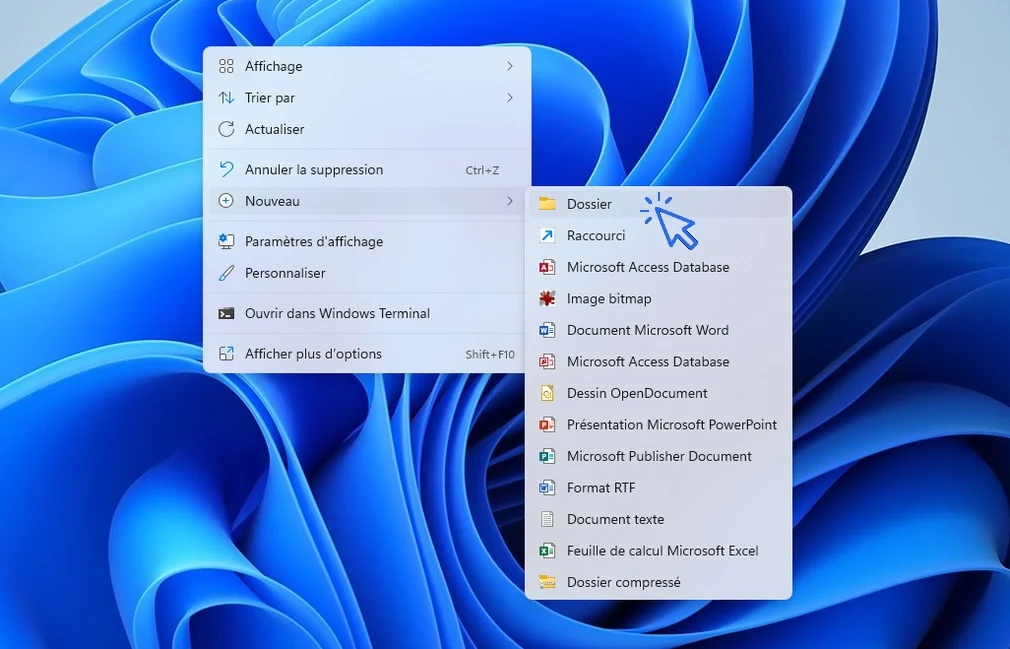
All that’s left is to give it a name. Press Enter on your keyboard or left-click next to the folder to confirm.
In File Explorer
To create folders in your personal directories (Documents, Pictures, Videos, Music, Downloads...), open File Explorer, then right-click → "New" → "Folder", as shown above.
However, you can also use the Explorer toolbar. Click on "+ New" in the toolbar (in Windows 10, a "New folder" icon is also available in the File Explorer toolbar). Select "Folder". All that’s left is to give it a name. Press Enter on your keyboard or left-click next to the folder to confirm.
2. Organize files and folders
3. FAQ - How to create a folder on Windows ?
1. How do I create a folder on the Windows desktop?
Right-click on the desktop, then select New → Folder. Name your folder and press Enter to confirm.
2. How do I create a folder in File Explorer?
Open File Explorer, go to Documents or any location, right-click and choose New → Folder.
3. Can I create multiple folders at once?
Not directly. You need to create folders one by one using the New → Folder option.
4. How do I rename a folder?
Right-click the folder, select Rename, type the new name, then press Enter.
5. How do I move a folder?
Click and hold the folder, drag it to the new location, then release. You can also use Cut → Paste.
6. Why should I create folders?
Folders help you organize your files (photos, documents, videos) so you can find them more easily.
7. Can I create folders on a USB drive?
Yes. Right-click inside the USB drive window and choose New → Folder, just like on your computer.
8. What is the difference between a file and a folder?
A file contains data (photo, document, video), while a folder is used to store and organize files.
Conclusion
If you want to go further, I offer free online computer courses to help you better understand how Windows works and become more comfortable using your computer.
End of the lesson
You know now how to create a folder in Windows, and how organize files.

Thibaut MATHIEU
Editor of Premiers Clics
Editor and writer of Premiers Clics, and author of the book “Je me mets à l'informatique” (only avalaible in french), I share all my computer knowledge to help you learn, using the Premiers Clics computer courses.
Also the manager of a computer support and repair company, I fully understand your needs in computer training and assistance. Every day, I answer my clients’ questions about their computers, phones, or tablets.
This experience has given me extensive knowledge in consumer digital technology, allowing me to separate fact from fiction in device protection, identify the most common user mistakes, and provide numerous tips to make the best use of PCs, smartphones, and tablets.

How to update Windows ?

10 Essential Windows Apps
Our Top 10 Windows Apps to Have.

Create an email account (Gmail)
How to create a Gmail account to send and receive emails.
Send emails and attachments
How to send emails and attachments. Example with Gmail.

Recover deleted files
How to recover deleted files in the Windows Recycle Bin.

Add a website to Favorites
How to add a website to your favorites (Google Chrome, Edge, Firefox, Opera...).
Change Google Chrome Homepage

Take a Screenshot
See how taking a screenshot in Windows
Increase display size
Create desktop shorcuts
How to create shortcuts on the desktop.

Connect a wifi printer
How connect a printer to your wifi network and how install it in Windows.
Smartphone Tips & Tricks

Connect Bluetooth speakers to phone
How connect a BT device like a speaker to your phone.

Solve internet issues
How to fix the main internet connections issues. Main troubleshooting steps.
Common Smartphone Problems

My phone is not charging
What should you do if your phone no longer charges?

I can't make calls
Check this tips if you can't make calls anymore.
No internet on my phone

My phone restarts by itself
Why does your phone restart by itself and how to fix it.
🔹 Computer Basics
🔹 Windows Course
- The Desktop
- The Sart Menu
- Empty Recycle Bin
- Recover deleted files
- Create and organize folders
- Create desktop shortcuts
- Pin a programm on the taskbar
- Compress a ZIP file
- Decompress a ZIP file
Organize files and folders
Customize your desktop
- Make a screenshot
- Make file and folder icons bigger
Understand the start menu and taskbar
- Open a downloaded file
- Change Windows Wallpaper
- Take a screenshot
🔹 Internet and Email
Open and use a web browser
- Creating a Gmail email
- How to send emails and attachments
- Browsing history in Chrome, Edge or Firefox
- Browsing download history in Chrome, Edge or Firefox
- Delete history in Chrome, Edge or Firefox
- Delete cookies and browsing data
- Set Google Chrome Homepage
Create and manage an email account
- How access Netflix from Phone, PC or Tablet
- What is a VPN ?
🔹 Computer Protection
🔹 Troubleshooting
🔹 Practical Life
Smartphone Problems: All Simple Step-by-Step Solutions

0 commentaire