
Home / Smartphone Tutorials
Recovering a Lost or Forgotten Steam Account

Recovering My Steam Account
Losing access to your Steam account can be stressful, especially if it contains years of purchased games, achievements, and saved progress. Whether you have forgotten your Steam username, lost access to your email, or simply can't remember your password, there are several ways to recover your account.
This guide explains the official recovery methods step by step, helping you regain access to your Steam account securely while avoiding common mistakes.
Before looking at how to recover your account, first check whether your account password has been saved by your browser or by another browser installed on your computer (Chrome, Firefox, Edge, Opera, etc.).
Table of Contents
- Recover your Steam account with your email or phone number
- Reset a forgotten Steam password
- Recover an account without email access
- Contact Steam Support if recovery fails
- FAQ

1. Recovering your Steam Account using Email or Phone
The quickest way to recover a forgotten Steam account is through the official Steam recovery page.
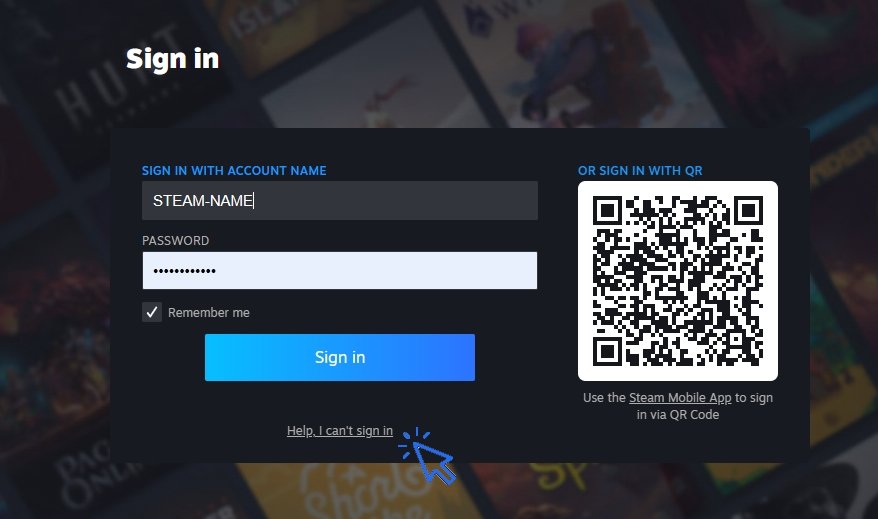
Click "Help, I can't sign in", then choose the option that best matches your situation. If your account is linked to a valid email address or phone number, Steam will send a verification code or password reset link. Be sure to check your spam or junk folder if the recovery email does not appear immediately. Once verified, you can create a new password and sign back into your account.
Let's look at it with pictures. Go to the official Steam website or open the Steam app. Then click "Help, I can't sign in." :
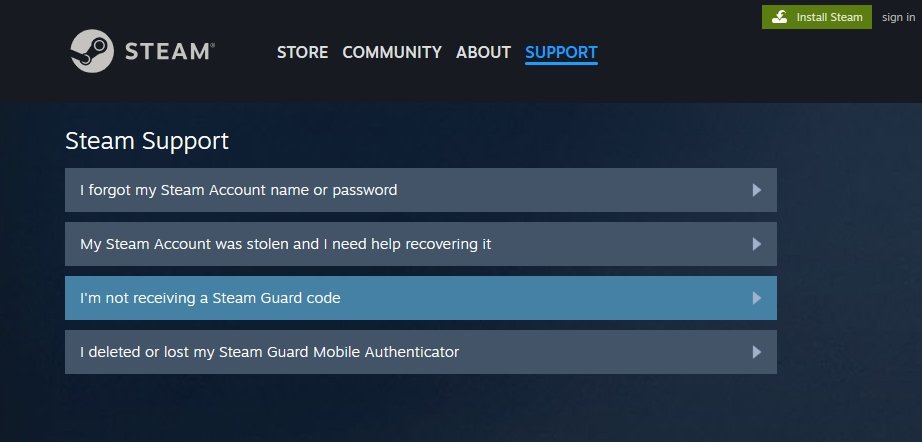
Next, choose the option that matches your situation :
2. Reset a Forgotten Steam Password
If you still remember your account but have forgotten your Steam password, select the password recovery option during sign-in (see above). Choose your registered email address, request a password reset, and follow the instructions sent by Steam. Create a strong, unique password that you do not use on other websites.
If Steam Guard is enabled, you may also need to approve the login using your authentication method before your password change is completed.
3. Recover a Steam Account Without Email Access
If you no longer have access to your registered email account, Steam still provides recovery options. You may be asked to verify ownership by providing information such as:
- previous passwords
- payment methods used on Steam
- purchase receipts
- product activation keys
- account creation details
The more accurate information you provide, the easier it is for Steam Support to confirm that you are the legitimate account owner.
4. Contact Steam Support for Account Recovery
If none of the automatic recovery methods work, contact Steam Support directly. Explain your situation clearly and provide as much information as possible to prove ownership of the account. Include previous email addresses, transaction details, or any other evidence requested.
After your account is recovered, update your recovery email, enable Steam Guard, and keep your contact information current. These security measures greatly reduce the risk of losing access again in the future4.
5. FAQ
How do I recover a forgotten Steam account?
Visit the Steam sign-in help page and select the recovery option. You can recover your account using your registered email address, phone number, or by verifying your identity with Steam Support.
Can I recover my Steam account without my email?
Yes. Steam Support allows account recovery even if you no longer have access to your email. You may need to provide purchase receipts, payment information, or previous account details.
What should I do if I forgot both my Steam username and password?
Use your email address or phone number on the Steam recovery page. Steam can help identify your account before allowing you to reset your password.
How long does Steam account recovery take?
Automatic password resets are usually immediate. If Steam Support must manually verify ownership, the recovery process may take from several hours to a few days.
Can Steam permanently delete my account?
Steam accounts are generally not deleted because of inactivity. If you cannot access your account, recovery is usually possible through the official support process.
Conclusion
A lost or forgotten Steam account can usually be recovered using the official recovery tools provided by Steam. Whether you need to reset your Steam password, recover your username, or verify account ownership without email access, following the official recovery process gives you the best chance of regaining access safely.
Once your account is restored, take a few minutes to strengthen its security by updating your recovery information and enabling Steam Guard to better protect your games and personal data.
Thibaut MATHIEU

Smartphone Tutorials & Windows Basics
Welcome to Premiers Clics, a free website designed to help beginners learn computer basics and use smartphones easily with our smartphone tutorials. Step-by-step guides, simple tutorials, and practical lessons for everyday use.

Thibaut MATHIEU
Editeur de Premiers Clics
Editor and writer of Premiers Clics, and author of the book “Getting Started with Computers” (only avalaible in french), I share all my computer knowledge to help you learn, using the Premiers Clics computer courses.
Also the manager of a computer support and repair company, I fully understand your needs in computer training and assistance. Every day, I answer my clients’ questions about their computers, phones, or tablets.
This experience has given me extensive knowledge in consumer digital technology, allowing me to separate fact from fiction in device protection, identify the most common user mistakes, and provide numerous tips to make the best use of PCs, smartphones, and tablets.

Create an email account (Gmail)
How to create a Gmail account to send and receive emails.

Decompress ZiP File
Learn how to compress and compress ZIP Files.
Mobile & Tablet Tutorials
We also offer lessons and practical guides for smartphones and tablets. You’ll learn how to:
Set up your device
- Send a photo with text message
- Adjust the volume of my phone
- Open settings
- Free up storage space
Install and use useful apps
- How to connect a Bluetooth speaker ?
Transfer photos
- Transfer contacts to new phone
- How to see my Google photos ?
- How to get wifi password
These lessons are ideal for users of Android smartphones and tablets.
Smartphone Problems: All Simple Step-by-Step Solutions
🔹 Computer Basics
🔹 Windows Course
- The Desktop
- The Sart Menu
- Empty Recycle Bin
- Recover deleted files
- Create and organize folders
- Create desktop shortcuts
- Pin a programm on the taskbar
- Compress a ZIP file
- Decompress a ZIP file
Organize files and folders
Customize your desktop
- Make a screenshot
- Make file and folder icons bigger
Understand the start menu and taskbar
- Open a downloaded file
- Change Windows Wallpaper
- Take a screenshot
🔹 Internet and Email
Open and use a web browser
- Creating a Gmail email
- How to send emails and attachments
- Browsing history in Chrome, Edge or Firefox
- Browsing download history in Chrome, Edge or Firefox
- Delete history in Chrome, Edge or Firefox
- Delete cookies and browsing data
- Set Google Chrome Homepage
Create and manage an email account
- How access Netflix from Phone, PC or Tablet
- What is a VPN ?
🔹 Computer Protection
Keep your computer safe from malware
- Protect my computer with a password
Install antivirus tools
Learn how to avoid scams online
🔹 Troubleshooting
🔹 Practical Life
Smartphone Problems: All Simple Step-by-Step Solutions




Other Tutorials

Windows Desktop Basics
Learn the Windows desktop basics, and personalize your screen.

How to use a Computer
Explore all our free computer courses for beginners and learn how to use a computer.

Adjust mobile's volume
Send a photo with text message
Speed up my phone
How to fix a slow phone ?

Access Netflix

Find wifi password with a phone
If you need to display the Wi-Fi password, you can do it with your smartphone.

Transfer contacts
Common Smartphone Problems

No internet on my phone

I can't make calls
Check this tips if you can't make calls anymore.

I can't receiving text messages
A troubleshooting tutorial if you ever do not receive or no longer receive messages (SMS).
My phone Freezing

My phone is not charging
What should you do if your phone no longer charges?

My battery is draining quickly
How to improve your phone battery life if your battery is draining quiclky.
Windows Basics
Change desktop background
How to change the Windows desktop background. Free online Windows Course.
Protect my computer using a password
How protect my computer with a password or a PIN code.

View download history
How to view the browser download history in Google.

0 commentaire