Computer Courses / Phone Tutorial
How to connect a bluetooth device on Android (Headphones, Speakers...)
Difficulty : Medium
Devices needed : a bluetooth device and a PC, phone or tablet

About Bluetooth connection
Bluetooth is a wireless connection technology that uses radio waves to connect devices. Many types of equipment are compatible with Bluetooth, but the most common are audio headphones, speakers, and computer mice. If you are not very familiar with this technology, this tutorial explains how to connect a Bluetooth device to an Android device, such as a smartphone or a tablet.
The steps described in this guide work on all Android devices, including tablets (Samsung, Huawei, Asus, etc.) as well as smartphones (Samsung, Huawei, Xiaomi, Oppo, and more).
Table of Contents
- Enable Bluetooth
- Pair the 2 Bluetooth devices
1. Enable Bluetooth
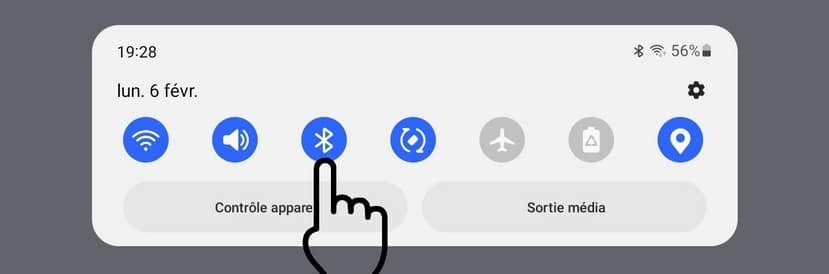
Before pairing your device with your tablet, make sure Bluetooth is enabled. From the top of the screen, swipe down to open the Quick Settings panel. The Bluetooth icon should be blue. If it isn’t, tap the icon once to turn Bluetooth on :
2. Appairer les 2 appareils en Bluetooth
Now, press and hold the Bluetooth icon for 1–2 seconds to open the Bluetooth settings:
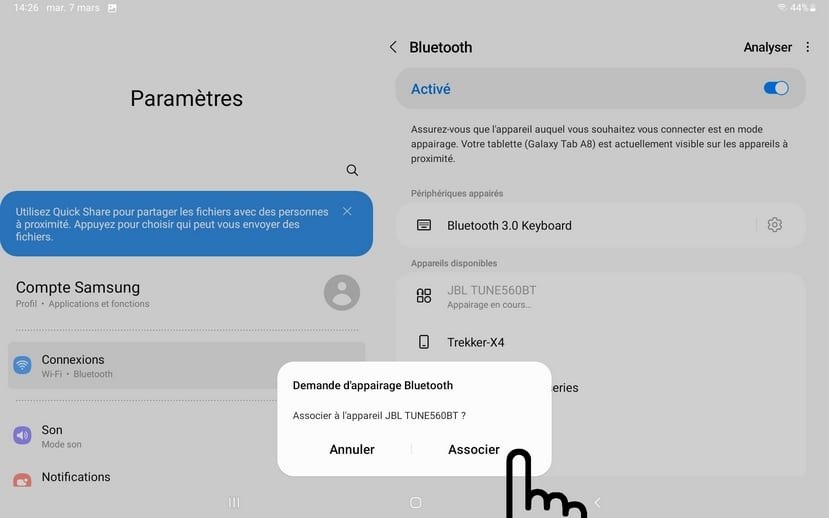
On your headphones or speaker, enable device discovery (see the device manual) so that your tablet can detect it. On devices like headphones or speakers, the Bluetooth LED (or power LED) usually flashes during this step. This process takes a few seconds, but sometimes it may take a few minutes…
When your headphones or speaker appears in the list, select it and tap “Pair.” :
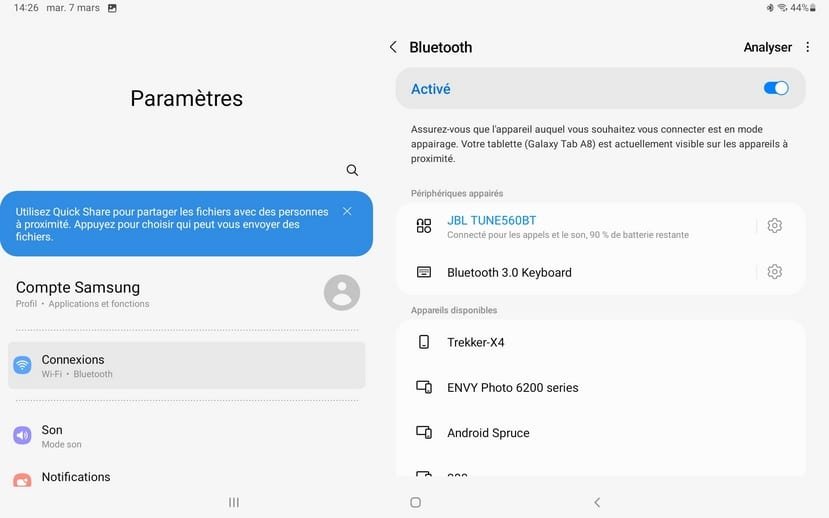
Your device is now connected via Bluetooth. The next time you turn on your headphones or speaker, it will automatically connect to your phone or tablet.
Note that you can change the volume of the speaker directly from your phone or your tablet. You can reed how change my phone's volume lesson if you needed to learn more about phone's basics.
How do you connect a Bluetooth device? (5 steps)
1. Turn on both devices
2. Enable Bluetooth pairing mode on the device
3. Open Bluetooth settings on your phone or computer
4. Select the device from the list
5. Confirm pairing to connect
End of Tutorial
You now know how to connect headphones or a speaker via Bluetooth.
Other Tutorials

Adjust mobile's volume
Send a photo with text message
Speed up my phone
How to fix a slow phone ?

Free up phone storage space

Access Netflix
Common Smartphone Problems

My phone is not charging
What should you do if your phone no longer charges?

I can't make calls
Check this tips if you can't make calls anymore.

Solve internet issues
How to fix the main internet connections issues. Main troubleshooting steps.
Windows Basics

Decompress ZiP File
Learn how to compress and compress ZIP Files.

Increase display size
Change desktop background
How to change the Windows desktop background. Free online Windows Course.
Protect my computer using a password
How protect my computer with a password or a PIN code.

Create an email account (Gmail)
How to create a Gmail account to send and receive emails.
View download history
How to view the browser download history in Google.
