Smartphones & Tablets / Tips & Tricks
How to View Your Photos with Google Photos?
[yoast_breadcrumb]

What is Google Photos used for ?

Using a cloud service for your photos and videos offers two main benefits: syncing your photos across your different devices (PC, smartphone, tablet) and automatically backing up your photos and videos. By default, you are given a minimum amount of storage space (15 GB, shared with Gmail).
Where are my pictures ?
📱 On a smartphone or tablet:
Simply open the Google Photos app. The app is often already installed on Android phones. Once opened, you will see all your photos automatically saved if backup is enabled.
💻 On a computer (PC or Mac):
Please note: on a computer, your Google Photos do not appear in the file explorer (such as the “Pictures” folder in Windows). They are not stored directly on your computer’s hard drive. To access them, you need to go through the internet. Here’s how to do it:
Access Google Photos on your PC
1. Open your web browser (Chrome, Firefox, Edge, etc.).
2. Go to the website: https://photos.google.com
3. Sign in with the same Google account you use on your phone.
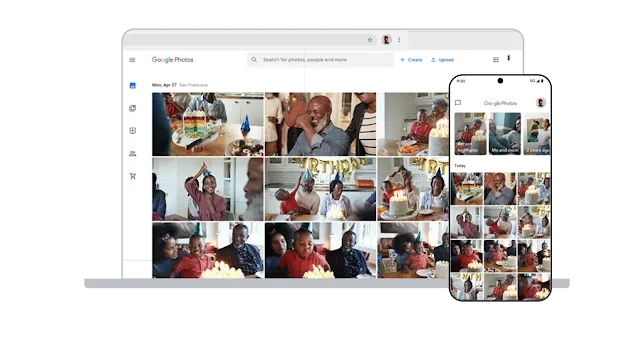
4. Once signed in, you will see all your photos and videos organized by date.
✅ You can search by location, by person, or by keyword (for example: “beach,” “dog,” “Paris”).
But… why use Google Photos?
With Google Photos, all your photos are automatically backed up online. You don’t have to worry about losing them in case of a device failure, theft, or phone change—they remain accessible at all times. You just need to sign in to your Google account from any device—smartphone, tablet, or computer—to access them.
Your photos and videos are therefore synchronized across all your devices. Google Photos also makes it easy to organize your images, create albums, share them with family and friends, or even make quick edits without complicated software. By default, you get 15 GB of free storage—note that this storage is also shared with Gmail—which can be upgraded for a small monthly fee.
Can you view your Google Photos directly in Windows, in the file explorer? (I get asked this often!)
No, this is not possible directly. The photos are stored in the cloud—that is, on Google’s servers—and not on your computer. However, if you want to save certain photos to your PC, you can:
Download them manually:
Click on a photo, then click the download icon (downward arrow).
It will be saved in your “Downloads” folder.
Use Google Takeout to download your entire library if you want to retrieve everything at once.
Can i use Google Photos instead of iCloud ?
Absolutely, you can easily switch from iCloud to Google Photos if you want to manage your photos through Google.
Here’s the order to follow:
1. Download the Google Photos app from the Apple Store.
2. Open the app and set it up so that photo and video syncing begins.
3. After a few hours, disable photo and video syncing with iCloud (iPhone Settings / iCloud / Back Up My Photos).

Send emails and attachments
How to send emails and attachments. Example with Gmail.

Create desktop shorcuts
How to create shortcuts on the desktop.
View Google browsing
How to check your Google browsing in Chrome, Edge or Firefox.
Connect a wifi printer
How connect a printer to your wifi network and how install it in Windows.
Solve main internet issues
How to fix internet issues. Main troubleshooting steps.

Speed up my phone
How to fix a slow phone ?

Thibaut MATHIEU
Editeur de Premiers Clics
Editor and writer of Premiers Clics, and author of the book “Getting Started with Computers” (only avalaible in french), I share all my computer knowledge to help you learn, using the Premiers Clics computer courses.
Also the manager of a computer support and repair company, I fully understand your needs in computer training and assistance. Every day, I answer my clients’ questions about their computers, phones, or tablets.
This experience has given me extensive knowledge in consumer digital technology, allowing me to separate fact from fiction in device protection, identify the most common user mistakes, and provide numerous tips to make the best use of PCs, smartphones, and tablets.

www.premiers-clics.fr
0 commentaires